Building Promptr
This post was last updated on Jul 03, 2026.
AI Usage Disclaimer
Growing up, I've always wanted to build a Linux-first GUI app. It's the one thing that always bothered me when I first decided to move from Windows - the scarcity of the GUI apps on Linux. Eventually, browsers got stronger, and a lot of stuff moved from native GUIs to web apps. Also, the WINE based workaround for Windows apps wasn't really a great experience either.
The problem with modern LLM chat interfaces is (at the time of writing this post) that they're too slow, especially when a conversation is too long, the UI in general looks bad (non-optimal use of screen real estate), and the whole experience isn't ...ergonomic.
Here are some of the chat interfaces I've had the misfortune to use since the announcement of ChatGPT back in 2022 (opinionated ranking by their horribleness):
Out of these, the first three are really horrible, and unusable to this date for some reason. Perplexity and T3 Chat have a nice UI and allow using different models, but they require a paid plan just for chats, and these are the only two AFAIK that support ?q=<text>, which people usually combine with Firefox's keyword bookmarks for quicker access. Btw, The only reason Perplexity is even in the list is because of the 1 year free promotional offer for Indian users, otherwise perplexity seems way more expensive, and now that the free offer is about to end, I, as a novice freeloader myself, am looking for alternatives.
I just want something that's -
- Fast AF to pull up when I'm in the middle of doing something, send a query, get a response, and continue asking follow-ups as much as I want.
- Preferably free, for reasonable LLM usage (with web-search and web-fetch toolcalls)
- I've spent enough time with markdown files that I can use my brain as the markdown parser.
- I don't want to launch a browser (Electron) just for this. It defeats the whole purpose.
- First class keyboard support.
This is what I'm building with Promptr:
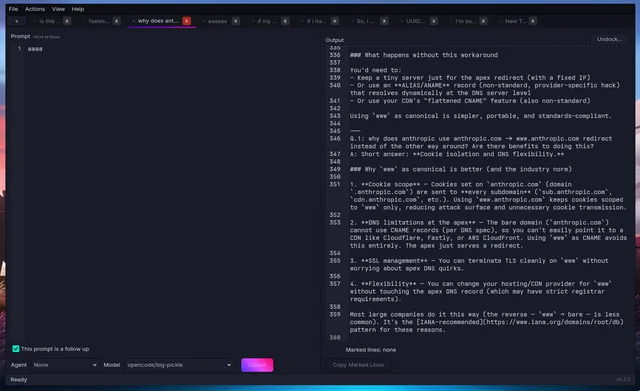
Edits
- (2026-07-03) - Add link to firefox's keyword shortcuts for search